


AI Content Aggregator –
Fresh Content, Every Day, Automatically
Building a blog that publishes consistently is hard work. AI Content Aggregator takes content from RSS feeds, Google Sheets, CSV files, or n8n workflows, rewrites it using advanced AI, and publishes unique posts to your WordPress or HTML site – in 16 languages, while you sleep.
What Is AI Content Aggregator?
AI Content Aggregator (ACA) is a SaaS tool that turns multiple content sources into a steady stream of original, AI-written blog posts. It accepts RSS feeds, Google Sheets, CSV files, n8n webhooks, and direct article URLs as input, extracts the key information, generates entirely new articles, and publishes them directly to your WordPress or HTML site on your schedule.
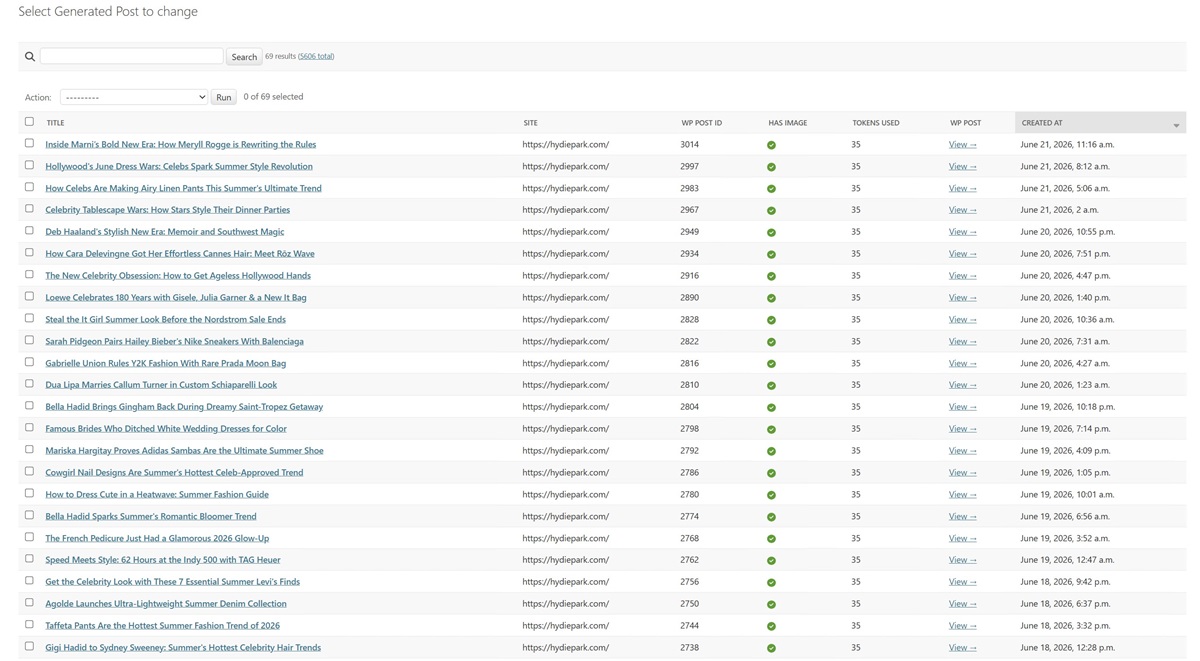
Every published post includes an SEO title, meta description, structured sections with H2 headings, hashtags, and optionally a featured image sourced or generated automatically. ACA handles the entire content pipeline from source to published post without any manual work.
💡 ACA does not copy content. It reads a source article for context, then instructs the AI to write a completely new, original post on the same topic. Every post is unique and safe for SEO.
Key Features
- Multiple content sources – RSS feeds, Google Sheets, CSV files, n8n webhooks, or direct article URLs
- AI-powered content rewriting using Claude, GPT-4, Gemini or GitHub
- 16 supported languages, AI writes natively in your chosen language
- 4 content styles: General News, Local News, Product Review, Celebrity/Entertainment
- Automatic featured image sourcing (Pexels stock photos or AI-generated)
- Custom prompt support – tell the AI exactly how to write your posts
- Location keywords – localise content for specific cities or regions
- Publish Destinations – mirror (or not) every new post to secondary WordPress or HTML sites automatically
- Per-destination category picker – choose which category to use on each destination site
- n8n and Make (Integromat) integration via API
- Scheduled publishing – hourly, twice daily, or daily
- Full post history and source tracking per site
- Manages multiple sites from one control panel
- 500 free token bonus – 25 on sign-up, 475 after the 7-day refund window
See It In Action
Supported Languages
Perfect For
✈️ Travel Bloggers
Pull from local tourism RSS feeds and news sites to keep your travel blog active in any destination – localised content published daily while you’re on the road.
🏠 Local Business Sites
Aggregate local news, council updates, and community events. ACA rewrites them with your location keywords so every post feels written for your neighbourhood.
🛒 Affiliate & Niche Sites
Feed product review RSS sources and let ACA write balanced, helpful review articles on your topic, published on schedule without lifting a finger.
⭐ Celebrity & Entertainment
Run multilingual celebrity news sites in English, Spanish, Italian, and more, from one control panel, one schedule, every site publishing unique content daily.
💰 Cost Per Post – Real Numbers
A freelance content writer charges $15–$50 per article. With ACA the cost is a fraction of that, and it never misses a day.
1-site plan: 1 post = $0.38 + AI provider cost
50-site plan: 1 post = $0.249 + AI provider cost
Every new account receives 500 free tokens: 25 on sign-up, and 475 more after the 7-day refund window.
Initial Setup – Under 5 Minutes
- Create your account – sign up at aicontentaggregator.com using the button in your WP plugin
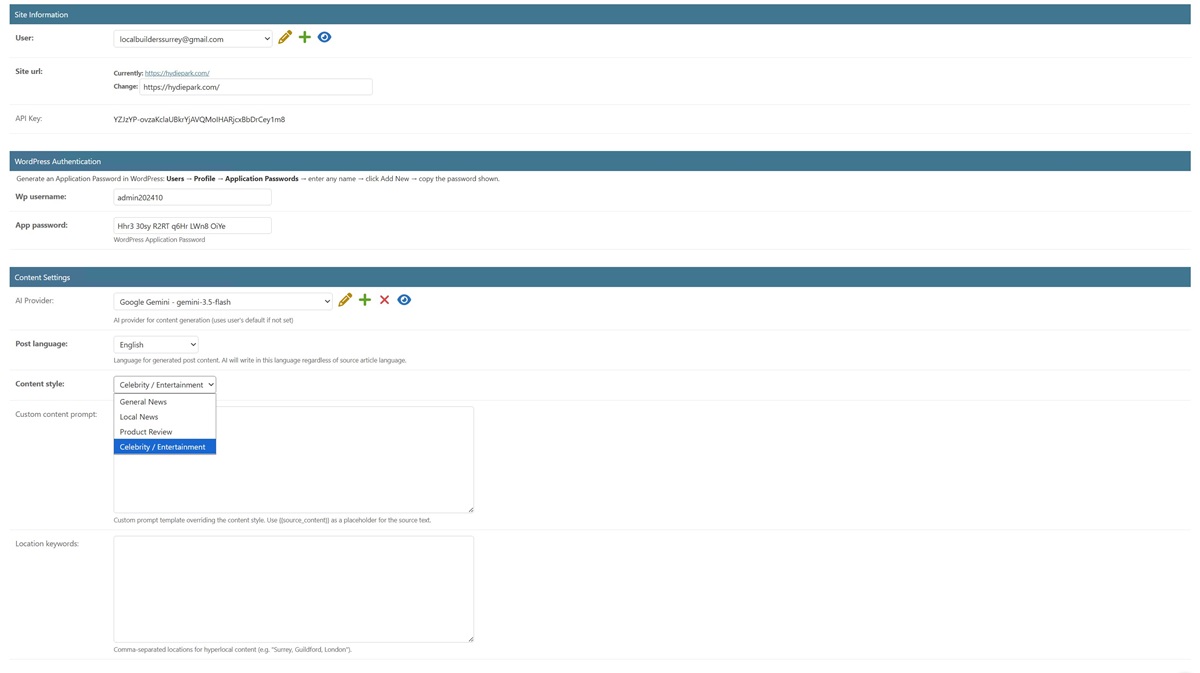
- Add your WordPress or HTML site – enter your site URL, Application Password, and username
- Test the connection – one click confirms credentials and loads your WordPress categories
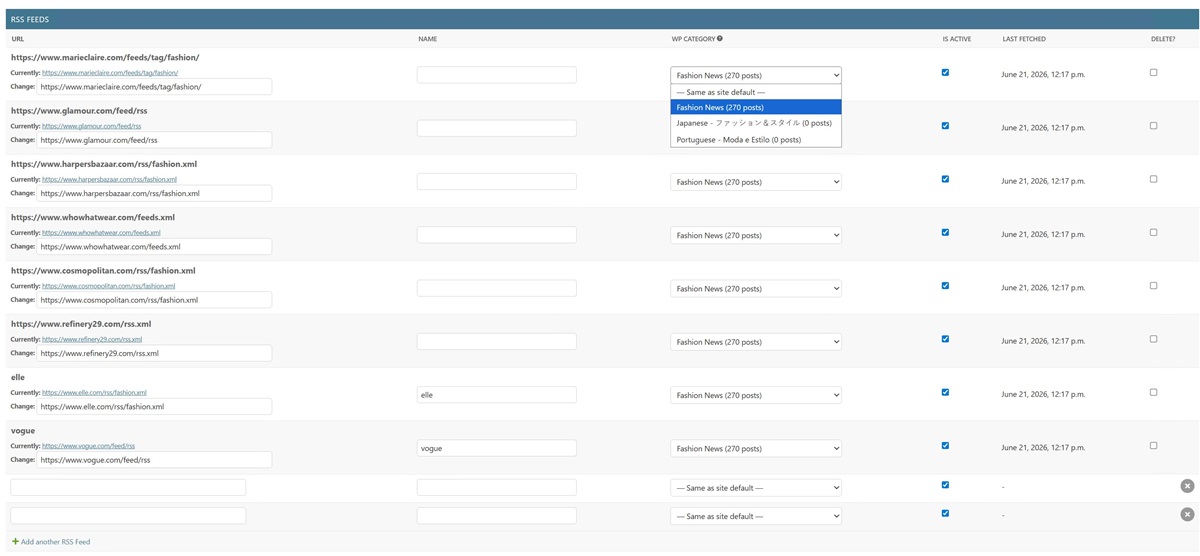
- Add your content sources – paste RSS feed URLs, connect Google Sheets, or upload a CSV file
- Choose your content style – General, Local News, Product Review, Celebrity/Entertainment, or your own prompt
- Click Publish Now – ACA fetches sources, generates the first article, and publishes it to your site
- Set your schedule – choose hourly, twice daily, or daily for automatic publishing
Who Is ACA For?
- Bloggers who want consistent content without daily writing
- Multi-site owners running news, niche, or local business websites
- SEO agencies building content portfolios for clients
- Affiliate marketers who need product review content at scale
- Travel bloggers, celebrity news publishers, local news curators
- Anyone building a website in a language they don’t speak fluently
🔥 Get the Full 3-Tool Bundle – Lifetime Deal
ACA is part of the AI Tools Integration Suite – 3 SaaS tools (ACA + ALB + AIPIG) managed from one control panel. One lifetime payment, no subscription.
One-time payment · No subscription · All 3 tools included · Up to 500 free bonus tokens on activation
▶ Watch: How to Set Up AI Content Aggregator
Want the complete walkthrough for all 3 tools? Watch the full 23-minute AI Tools Integration Suite setup video →
Affiliate Programme – 30% Commission
Earn 30% commission on every sale you refer. Whether you have a blog, YouTube channel, or SEO community, our affiliate programme turns your recommendations into consistent income. Apply at Gumroad Affiliate Program →
Frequently Asked Questions
What is AI Content Aggregator and how does it work?
AI Content Aggregator is a cloud SaaS platform that monitors RSS feeds and CSV URL lists, rewrites each article as a unique AI-generated post, and publishes it directly to your WordPress or HTML site – automatically, on a schedule you control.
All processing runs on dedicated cloud servers. Your WordPress site only receives the finished post via REST API, the same as a standard publish action. There are no cron jobs running on your hosting server, no background processes competing with your other plugins, and no performance impact on your site regardless of how many feeds you monitor or how often scans run.
The basic workflow is straightforward: install the lightweight connector plugin on your WordPress site, register your account, connect your site using a WordPress Application Password, add your RSS feeds or CSV URL lists, configure your AI provider and content settings, and click Scan Now, or let auto-scan run on your chosen schedule. Each new article is extracted and rewritten by AI as a structured post with a title, three content sections with subtitles, a meta description, #tags, and published automatically.
Who is AI Content Aggregator designed for?
AI Content Aggregator is built for anyone who needs to publish fresh content consistently without spending hours writing each post by hand. The most common use cases are:
- Bloggers and content creators who want to maintain a publishing schedule without burnout
- SEO agencies managing automated content pipelines across multiple client WordPress sites from one dashboard
- Affiliate marketers keep niche sites active with relevant content that reinforces their keyword and linking strategy
- Local businesses building a consistent stream of location-relevant posts that support local SEO without hiring a content team
- Travel blogs that need destination-specific content across a large archive of posts
- Product and news sites that need to process large volumes of articles quickly and consistently
- Multilingual publishers who need to produce content in languages other than English. The platform supports ten languages, including Spanish, Italian, Polish, Russian, Greek, Chinese Simplified, German, French, Portuguese, and more
- If you manage one WordPress site or fifty, the platform scales to fit. Agency plans support up to 50 connected sites from a single account, with independent settings for each site.
Can I use it with any URL, or only RSS feeds?
Both. RSS feeds and individual URLs are fully supported, and they work independently of each other.
For RSS feeds, you add the feed URL once, and the platform monitors it automatically on your chosen schedule: hourly, twice daily, or daily. Each feed can publish to a different WordPress category, and a feed age limit setting lets you control how far back the platform looks: 24 hours, 48 hours, 7 days, 30 days, or no limit, so you never accidentally flood your site with old articles when adding a new feed.
For individual URLs, the URL queue feature lets you import any article, product page, or web URL to be rewritten as a WordPress post. You can add URLs one at a time, upload a CSV file, or import from a Google Sheets list. The URL queue has its own daily rate limit setting, completely independent from your RSS scan rate, so you control exactly how many posts come from each source every day.
For individual URLs, the URL queue feature lets you import any article, product page, or web URL and have it rewritten as a WordPress post. You can add URLs one at a time, upload a CSV file, or import from a Google Sheets list. The URL queue has its own daily rate limit setting, completely independent from your RSS scan rate, so you control exactly how many posts come from each source every day.
What are Relevant Keywords and how do they work?
Relevant Keywords are custom phrases you define that the AI weaves naturally into every generated post. Each keyword is also automatically added as a WordPress tag, building your site’s tag taxonomy with every published post.
The real power comes when you add a target URL to a keyword. That keyword becomes a live hyperlink in every post, pointing to any page you choose, your homepage, a service page, a product review, an affiliate link, or any URL on the internet. This means every piece of content the platform publishes automatically reinforces your internal linking structure and drives traffic to your most important pages.
The keywords per post setting lets you control how many keywords appear in each post. Set a number, for example, five, and the platform randomly samples five from your active keyword list for each post, keeping content varied and natural across high publishing volumes. Set it to zero to include all active keywords in every post.
Location keywords extend this further for geographically targeted sites. Add city and area names like London, Surrey, Croydon, or Manhattan, Brooklyn, SoHo, and the AI incorporates them into every post automatically, even when the source article has no geographic connection. This is particularly useful for local business sites and travel blogs that need consistent hyperlocal content angles across their entire publishing output.
Keywords can be added manually in the dashboard, imported in bulk via CSV, or pulled from a Google Sheets URL. Each keyword can be activated or deactivated independently at any time.
Which AI providers and languages are supported?
You bring your own API key for any supported AI provider, and you pay your provider directly at their rates, with no markup from the platform. Supported providers are:
✅ Anthropic Claude: All Claude’s latest models
✅ OpenAI: gpt-4o, gpt-4o-mini, and other OpenAI models
✅ Google Gemini: gemini-3.5-flash, gemini-3.5-pro, and other Gemini models
✅ GitHub Models: DeepSeek, Llama, Mistral, and other models
✅Replicate: any model hosted on the Replicate platform
You can switch between providers at any time from your dashboard. Different sites in your account can use different providers independently, with a cost-efficient model for high-volume sites and a premium model for clients where content quality is the priority.
AI Content Aggregator writes posts in 16 languages: English, Spanish, Italian, Polish, Russian, Greek, Chinese Simplified, German, French, Portuguese, and others. The language is set per site. The AI writes the entire post in your chosen language, regardless of what language the source article was written in, no translation plugins required, no manual editing needed.
For images, seven providers are supported: Pexels free stock photos, Replicate with FLUX Schnell, Ideogram V3, and SDXL, Black Forest Labs with FLUX.1 dev and FLUX 1.1 pro Ultra, and GitHub Models . Images are automatically set as the WordPress featured image.
How does the token billing system work?
AI Content Aggregator runs on a simple token system; you only spend tokens when a post is successfully published to your WordPress site. Scan runs that find no new content cost nothing. Failed posts cost nothing. You pay only for results.
Token costs per post are:
10 tokens – 1 post with no image and no keywords
20 tokens – 1 post with an AI-generated featured image
15 tokens – 1 post with 1 relevant keyword and no image
25 tokens – 1 post with an AI-generated image and 1 relevant keyword
+5 tokens per additional active relevant keyword per post
Every new site connection immediately credits 25 free welcome tokens, enough to test the platform properly with real content before purchasing a top-up. Token packages are available in four sizes: 250, 500, 1,000, and 5,000 tokens. Tokens never expire and are shared across all your connected WordPress sites under a single account balance; there are no separate budgets per site to manage.
Your current token balance is always visible directly in the WordPress plugin settings panel. A full transaction ledger in the cloud dashboard shows every deduction with the post title, source, and date. It’s complete transparency on exactly where your tokens went.
Will it slow down my WordPress site or conflict with other plugins?
No. AI Content Aggregator is specifically designed to have zero impact on your WordPress hosting performance.
All scanning, content generation, AI processing, and image sourcing run on dedicated cloud servers, entirely separate from your WordPress hosting. Your WordPress site only receives a standard REST API POST request when a new post is ready to publish, exactly the same as any other publish action. There are no WP-Cron jobs, background processes, or scheduled tasks running on your hosting server at any point.
This means the platform works correctly on shared hosting, VPS servers, and managed WordPress hosting without any performance issues, even when processing large numbers of feeds or running frequent scans. The server resource problems that affect traditional cron-based autoblogging plugins do not apply to AI Content Aggregator because nothing runs on your server.
The plugin is fully compatible with Yoast SEO, RankMath, and all major WordPress SEO plugins. It publishes posts via the standard WordPress REST API and does not modify SEO metadata, schema markup, or any settings managed by other plugins. Plugin updates are delivered automatically through the licensing system once your license is active.
If you encounter any issues during setup or testing, the real-time scan status and token balance are visible directly in the WordPress plugin settings panel, and the cloud dashboard provides detailed scan logs showing exactly what happened during each run.